Adsense code (2021-10-05)

Wednesday, March 16, 2011

Code::Blocks: a free C++ IDE

Code::Blocks is a free C++ IDE built to meet the most demanding needs of its users. It is designed to be very extensible and fully configurable.

Finally, an IDE with all the features you need, having a consistent look, feel and operation across platforms.

Built around a plugin framework, Code::Blocks can be extended with plugins. Any kind of functionality can be added by installing/coding a plugin. For instance, compiling and debugging functionality is already provided by plugins!


http://www.codeblocks.org/

Friday, March 11, 2011

Re-install Transmission BitTorrent Client

Transmission is my favorite BitTorrent Client in Ubuntu, so far. One day, Transmission cannot be started. When I click on the icon, nothing happen. And i cannot re-install it, using both Ubuntu Software Center and Synaptic Package Manager.

Finally, I re-install it using the commands:

$sudo add-apt-repository ppa:transmissionbt/ppa

$sudo apt-get update

$sudo apt-get install transmission

It's work again now:)

Tuesday, February 22, 2011

Install gcc-3.4 on Ubuntu 10.10

To Install gcc-3.4 on Ubuntu 10.10, you need to download and install:

- gcc-3.4-base
http://packages.ubuntu.com/hardy-updates/gcc-3.4-base

- cpp-3.4
http://packages.ubuntu.com/hardy-updates/cpp-3.4

- gcc-3.4
http://packages.ubuntu.com/hardy-updates/gcc-3.4

On each downloaded files, right click and select "Open with Ubuntu Software Center".

Finally, type the command to make gcc-3.4 as default.
~$export CC=gcc-3.4

İnstall git on Linux

To install git on Linux, you need to have right of su.
~$sudo apt-get install git


Saturday, February 19, 2011

QEMU: a open source machine emulator and virtualizer

QEMU is a generic and open source machine emulator and virtualizer.

When used as a machine emulator, QEMU can run OSes and programs made for one machine (e.g. an ARM board) on a different machine (e.g. your own PC). By using dynamic translation, it achieves very good performance.

When used as a virtualizer, QEMU achieves near native performances by executing the guest code directly on the host CPU. QEMU supports virtualization when executing under the Xen hypervisor or using the KVM kernel module in Linux. When using KVM, QEMU can virtualize x86, server and embedded PowerPC, and S390 guests.

Link:
- http://wiki.qemu.org/Main_Page


To install QEMU on Ubuntu:
~$sudo apt-get install qemu

Thursday, February 17, 2011

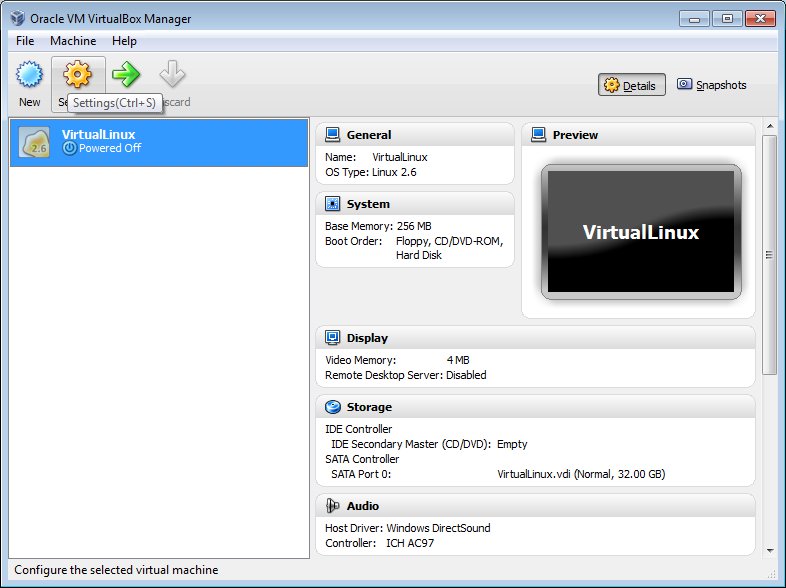
Install Ubuntu on VirtualBox running in Windows host

- Download Oracle VM VirtualBox from http://www.oracle.com/technetwork/server-storage/virtualbox/downloads/index.html


- Run the downloaded VirtualBox setup and follow the steps to complete the installation.

- Run VirtualBox after installation completed.

- Create a new virtual machine by clicking on the New icon.


In order to make the target virtual machine run smoothly, I assign 1000M to virtual machine, almost half of my memory.

- Select to create new hard disk for Boot Hard Disk.


- Select size of virtual disk, 32G in my case.


- Select the new virtual machine and click Settings icon.


- Set up virtual CD/DVD driver.


- Browse to select the downloaded Linux ISO image file.

Now you can start the new virtual machine to setup Linux, just follow the normal steps of Ubuntu setup.

Tuesday, February 8, 2011

Shutter : Feature-rich Screenshot Tool


Shutter is a feature-rich screenshot program. You can take a screenshot of a specific area, window, your whole screen, or even of a website – apply different effects to it, draw on it to highlight points, and then upload to an image hosting site, all within one window. Shutter is free, open-source, and licensed under GPL v3.

http://shutter-project.org/