$ sudo apt-get install libgtk-3-dev
Showing posts with label Development. Show all posts
Showing posts with label Development. Show all posts
Thursday, December 26, 2013
Install GTK+3 on Ubuntu
To install GTK+3 development tools on Ubuntu Linux, enter the command in terminal:
$ sudo apt-get install libgtk-3-dev
$ sudo apt-get install libgtk-3-dev

Friday, January 4, 2013
Install GCC 4.7.2 on Ubuntu Linux
To try the new of C++11 on Ubuntu, we can install GCC 4.7 or later. GCC 4.7.2 have been release.
To install GCC 4.7 on Ubuntu, open a Terminal and type the command:
sudo add-apt-repository ppa:ubuntu-toolchain-r/test
sudo apt-get update
sudo apt-get install g++-4.7 c++-4.7
To made the g++4.7 as default, type the command:
sudo update-alternatives --install /usr/bin/gcc gcc /usr/bin/gcc-4.7 20
sudo update-alternatives --install /usr/bin/g++ g++ /usr/bin/g++-4.7 20
sudo update-alternatives --config gcc
sudo update-alternatives --config g++
To install GCC 4.7 on Ubuntu, open a Terminal and type the command:
sudo add-apt-repository ppa:ubuntu-toolchain-r/test
sudo apt-get update
sudo apt-get install g++-4.7 c++-4.7
To made the g++4.7 as default, type the command:
sudo update-alternatives --install /usr/bin/gcc gcc /usr/bin/gcc-4.7 20
sudo update-alternatives --install /usr/bin/g++ g++ /usr/bin/g++-4.7 20
sudo update-alternatives --config gcc
sudo update-alternatives --config g++
Tuesday, January 31, 2012
Ubuntu Developer Week - January 31st - February 2nd 2012
In just five years, Ubuntu has become the most popular Linux distribution in the world with millions of users. Ever wondered how Ubuntu development works? How to get involved yourself? Find out from January 31st 2012 to February 2nd 2012!
Ubuntu Developer Week is a series of online workshops where you can:
Know more: https://wiki.ubuntu.com/UbuntuDeveloperWeek
Ubuntu Developer Week is a series of online workshops where you can:
- learn about different packaging techniques
- find out more about different development teams
- check out the efforts of the world-wide Development Community
- participate in open Q&A sessions with Ubuntu developers
- much more...
Know more: https://wiki.ubuntu.com/UbuntuDeveloperWeek
Thursday, December 22, 2011
Bluefish - editor for programmers and web designers

Bluefish is a powerful editor targeted towards programmers and webdesigners, with many options to write websites, scripts and programming code. Bluefish supports many programming and markup languages, and it focuses on editing dynamic and interactive websites. Bluefish is an open source development project, released under the GNU GPL licence.
Bluefish runs on most (maybe all?) POSIX compatible operating systems including Linux, FreeBSD, MacOS-X, OpenBSD and Solaris, and in addition it runs on Windows.
Introduction to Bluefish 2.2.0
Website: http://bluefish.openoffice.nl/
Monday, September 26, 2011
Install GTK+ on Ubuntu
The GTK+ is a multi-platform toolkit for creating graphical user interfaces. Offering a complete set of widgets, the GTK+ is suitable for projects ranging from small one-off tools to complete application suites.
The package contains the header files and static libraries which is needed for developing the GTK+ applications.
To install GTK+ on Ubuntu 11.04
- Start Synaptic Package Manager, in System -> Administration -> Synaptic Package Manager.
- Search "libgtk-3-dev".
- Mark to instal, and also the required components.
- Click Apply.
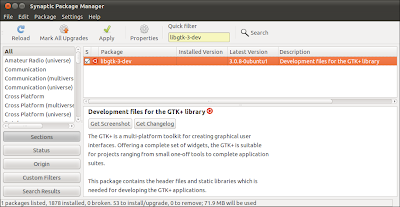
The package contains the header files and static libraries which is needed for developing the GTK+ applications.
To install GTK+ on Ubuntu 11.04
- Start Synaptic Package Manager, in System -> Administration -> Synaptic Package Manager.
- Search "libgtk-3-dev".
- Mark to instal, and also the required components.
- Click Apply.

Anjuta DevStudio: GNOME Integrated Development Environment

Anjuta DevStudio is a versatile software development studio featuring a number of advanced programming facilities including project management, application wizard, interactive debugger, source editor, version control, GUI designer, profiler and many more tools. It focuses on providing simple and usable user interface, yet powerful for efficient development.
web site: http://www.anjuta.org/
Wednesday, March 16, 2011
Code::Blocks: a free C++ IDE
Code::Blocks is a free C++ IDE built to meet the most demanding needs of its users. It is designed to be very extensible and fully configurable.
http://www.codeblocks.org/
Finally, an IDE with all the features you need, having a consistent look, feel and operation across platforms.
Built around a plugin framework, Code::Blocks can be extended with plugins. Any kind of functionality can be added by installing/coding a plugin. For instance, compiling and debugging functionality is already provided by plugins!
http://www.codeblocks.org/
Monday, October 11, 2010
Install Eclipse on Ubuntu 10.10

Eclipse is an open source community whose projects are focused on building an extensible development platform, runtimes and application frameworks for building, deploying and managing software across the entire software lifecycle. Many people know us, and hopefully love us, as a Java IDE but Eclipse is much more than a Java IDE.
To install Eclipse on Ubuntu 10.10
- Start Ubuntu Software Center, by clicking on Application -> Ubuntu Software Center.

- Type Eclipse in the search box, select the Eclipse item and click Install.

Please note that the current supported Eclipse in Ubuntu is Galileo 3.5.2 (Not the most updated Helios 3.6.1).

Wednesday, October 6, 2010
Qt SDK 2010.05.1 for Linux released
The now released Qt SDK 2010.05.1 for Linux is only available for x86 (32-bit) and x86_64 (64-bit) Linux environments. This version include GTK style plugin, it make Qt to have look native on Gnome.
Source: http://labs.qt.nokia.com/2010/10/06/qt-sdk-2010-05-1-for-linux-released/
Source: http://labs.qt.nokia.com/2010/10/06/qt-sdk-2010-05-1-for-linux-released/
Saturday, October 2, 2010
GCC 4.4.5 has been released

GCC 4.4.5 has been released.
The GNU Compiler Collection includes front ends for C, C++, Objective-C, Fortran, Java, and Ada, as well as libraries for these languages (libstdc++, libgcj,...). GCC was originally written as the compiler for the GNU operating system. The GNU system was developed to be 100% free software, free in the sense that it respects the user's freedom.
Related Site:
- GCC, the GNU Compiler Collection - GNU Project - Free Software Foundation (FSF)
Qt: a cross-platform application and UI framework

Qt is a cross-platform application and UI framework. Using Qt, you can write applications once and deploy them across many desktop and embedded operating systems without rewriting the source code.
The vision is to have Qt Everywhere and to enable you to create advanced applications with innovative user experiences while getting to market quickly.
Intro to Qt
Qt is a cross-platform application and UI framework used by hundreds of thousands of developers worldwide looking to create amazing user experiences on Windows, Mac, Linux/X11, embedded Linux, Windows CE , Windows Mobile, Symbian and Maemo devices.
Qt is used by thousands of companies in a multitude of leading industries enabling them to develop software and devices used by hundreds of millions of people every day.
Have a look at our video and find out how Qt will shape the future of application and UI development.
Subscribe to:
Posts (Atom)