
Tuesday, October 18, 2011
Shortcut to start Terminal in Ubuntu
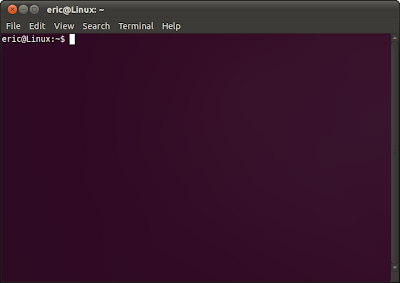
Terminal is a useful tools for Linux, it can be strated by press pressing the keys [Ctrl] + [Alt] + T simultaneously.

Saturday, October 15, 2011
Install Google Chrome on Ubuntu 11.10
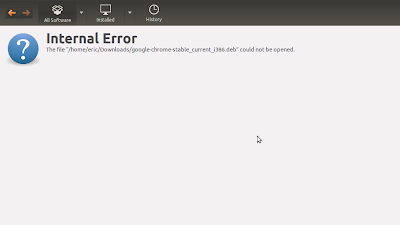
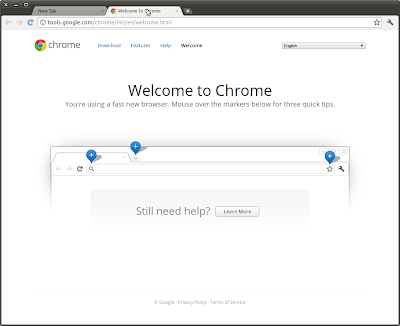
Install Google Chrome on Ubuntu 11.10 as normal way: Download deb package and click to install will be complained for Internal Error:
Follow the steps to install Google Chrome on Ubuntu 11.10:
- Download deb package of Google Chrome to your local folder, eg. /Downloads/
- Open Terminal and switch to the downloaded folder.
- type the command
$sudo dpkg -i google-chrome-stable_current_i386.deb
Enter password and continuous, error will be reported in this step.
- type the command
$sudo apt-get install -f
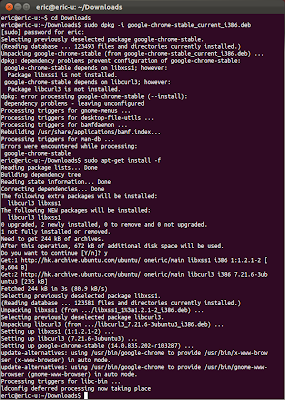
Finished! Google Chrome will be installed:)

Follow the steps to install Google Chrome on Ubuntu 11.10:
- Download deb package of Google Chrome to your local folder, eg. /Downloads/
- Open Terminal and switch to the downloaded folder.
- type the command
$sudo dpkg -i google-chrome-stable_current_i386.deb
Enter password and continuous, error will be reported in this step.
- type the command
$sudo apt-get install -f

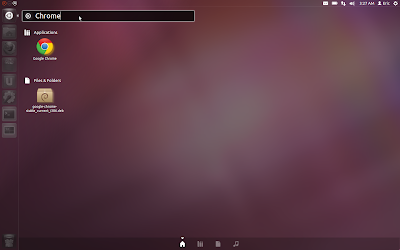
Finished! Google Chrome will be installed:)


Wednesday, October 12, 2011
darktable: an open source photography workflow application and RAW developer
 darktable is an open source photography workflow application and RAW developer. A virtual lighttable and darkroom for photographers. It manages your digital negatives in a database, lets you view them through a zoomable lighttable and enables you to develop raw images and enhance them.
http://www.darktable.org/
For Ubuntu (11.04), type the command in Terminal.
sudo add-apt-repository ppa:pmjdebruijn/darktable-release
sudo add-apt-repository ppa:pmjdebruijn/darktable-release-plus
sudo apt-get update
Then Search "darktable" in Ubuntu Software Center to install.
Wednesday, September 28, 2011
Sound Juicer

Sound Juicer is a clean, mean, and lean CD ripper for GNOME 2.
It sports a clean interface and simple preferences, aiming to do The Right Thing and What You Mean all of the time. It requires GNOME and GStreamer.
It can be installed in Ubuntu Software Center, by searching "Sound Juicer".
A CD ripper for GNOME which aims to have a simple, clean, easy to use interface.
The package includes support by default for Vorbis and FLAC formats. For other supports you need the following packages:
- gstreamer0.10-plugins-ugly to encode to MP2,
- gstreamer0.10-lame (not available in the Debian archive) to encode to MP3,
- gstreamer0.10-plugins-really-bad (not available in Debian) to encode to AAC.
Rip CD to MP3 in Ubuntu

Ubuntu Documentation have a good document describe about CDRipping:
- https://help.ubuntu.com/community/CDRipping
Xubuntu

Xubuntu is a community developed, Ubuntu-based Linux operating system that is well-suited for both laptops and desktops. It contains all the applications you need - a web browser, document and spreadsheet editing software, instant messaging and much more.
Xubuntu 11.04 is now available!
http://www.xubuntu.org/
Monday, September 26, 2011
Install GTK+ on Ubuntu
The GTK+ is a multi-platform toolkit for creating graphical user interfaces. Offering a complete set of widgets, the GTK+ is suitable for projects ranging from small one-off tools to complete application suites.
The package contains the header files and static libraries which is needed for developing the GTK+ applications.
To install GTK+ on Ubuntu 11.04
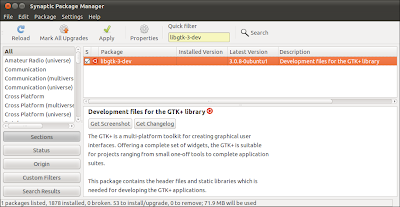
- Start Synaptic Package Manager, in System -> Administration -> Synaptic Package Manager.
- Search "libgtk-3-dev".
- Mark to instal, and also the required components.
- Click Apply.
The package contains the header files and static libraries which is needed for developing the GTK+ applications.
To install GTK+ on Ubuntu 11.04
- Start Synaptic Package Manager, in System -> Administration -> Synaptic Package Manager.
- Search "libgtk-3-dev".
- Mark to instal, and also the required components.
- Click Apply.

Subscribe to:
Posts (Atom)