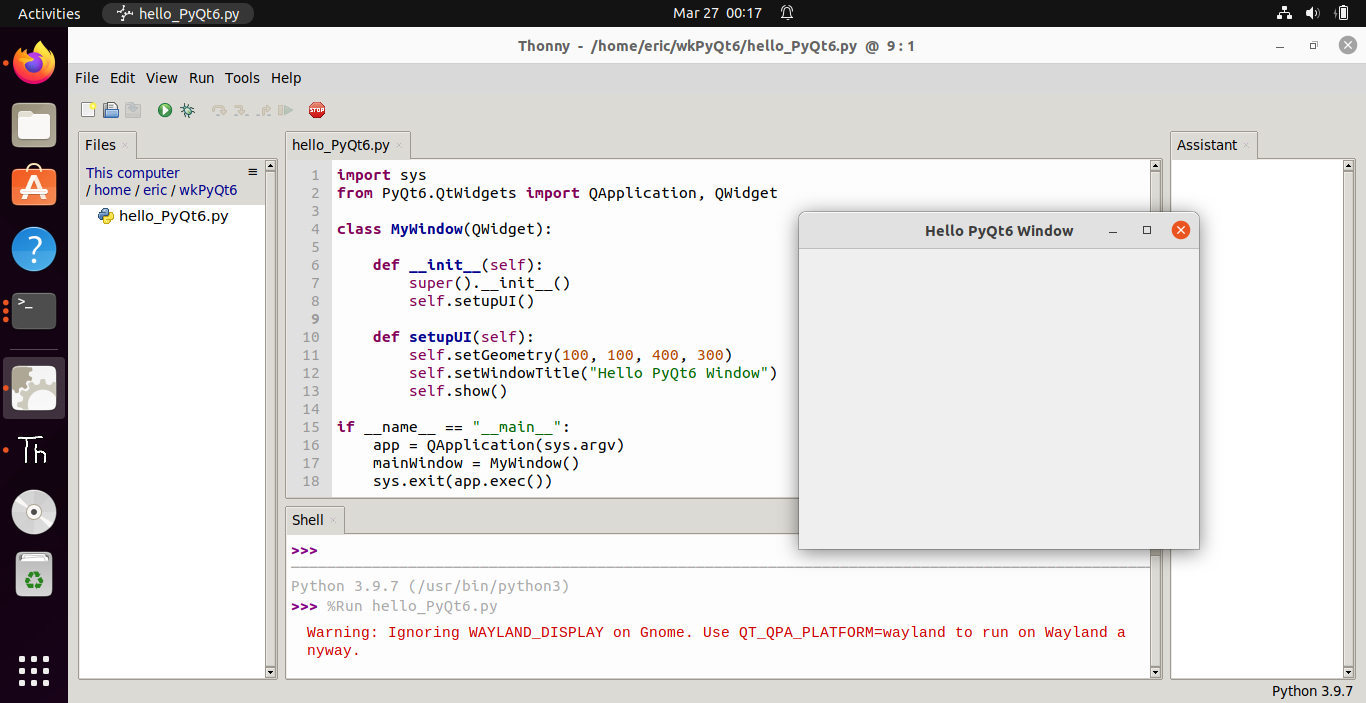
To install PyQt6 for Python 3 on Linux (Tested on Ubuntu 21.10 over VirtualBox):
$ pip3 install PyQt6
Adsense code (2021-10-05)
Saturday, March 26, 2022
Install PyQt6 on Linux
Wednesday, October 6, 2021
Install wxPython on Linux Mint 20.2
To install wxPython on Linux Mint 20.2, for Python 3, enter the command in Terminal:
pip3 install -U \
-f https://extras.wxpython.org/wxPython4/extras/linux/gtk3/ubuntu-20.04 \
wxPython
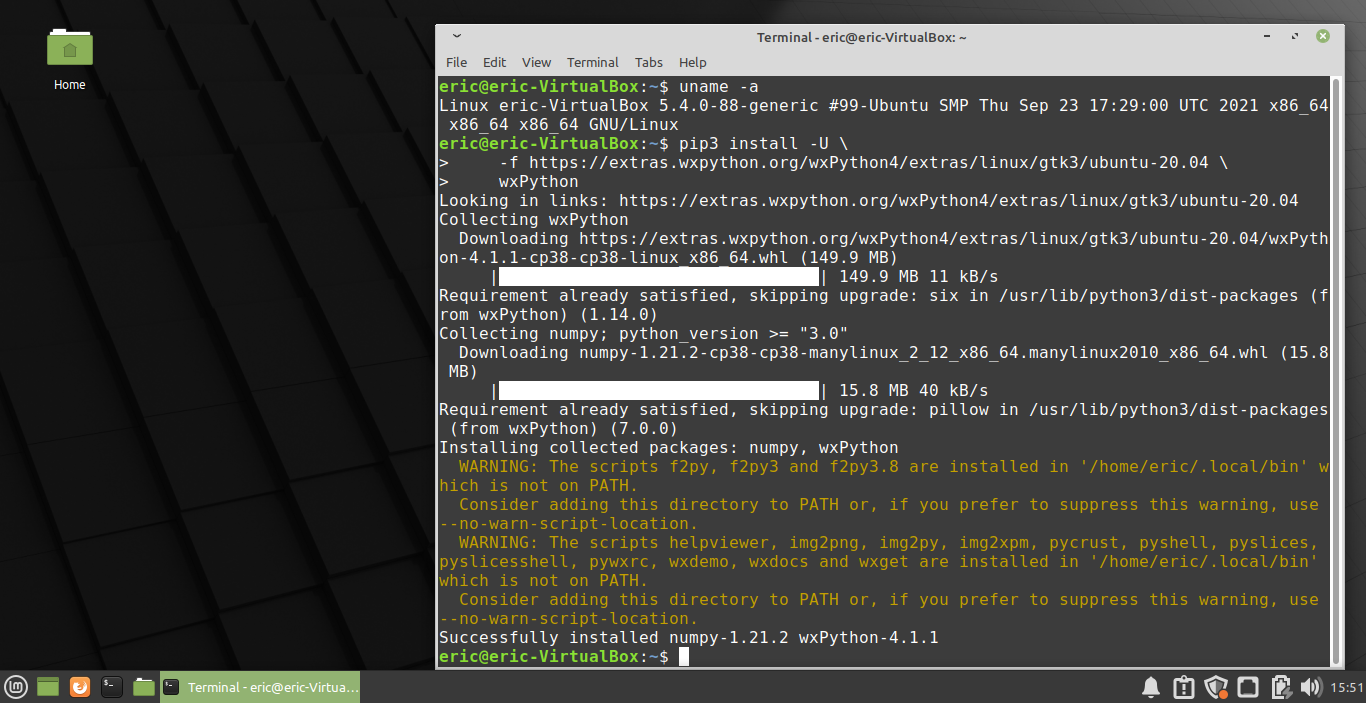
Tested on Linux Mint 20.2 xfce, run on VirtualBox 6.1.
ref:
Thursday, September 30, 2021
Install dfu-util on Raspberry Pi
dfu-util is a host side implementation of the DFU 1.0 and DFU 1.1 specifications of the USB forum. DFU is intended to download and upload firmware to/from devices connected over USB. It ranges from small devices like micro-controller boards to mobile phones. Using dfu-util you can download firmware to your DFU-enabled device or upload firmware from it.
See the manual page for examples of use.
To install dfu-util on Raspberry Pi, enter the command in Terminal:
$ sudo apt install dfu-util
Tuesday, June 23, 2020
Install Python 2 and pip on Ubuntu 20.04
To install Python 2 on Ubuntu 20.04:
$ sudo apt install python
or
$ sudo apt install python2
python-pip may be no exists anymore in 20.04, and looks like it has been removed from the repositorie.
To install pip for Python :
$ curl https://bootstrap.pypa.io/get-pip.py -o get-pip.py
$ sudo python2 get-pip.py
If you run "python2 get-pip.py" without sudo, you have to set PATH after installed.
Monday, June 20, 2016
The world's fastest supercomputer, Sunway-TaihuLight by China, run Linux
Sunway-TaihuLight, a new-generation supercomputer installed in the east China city of Wuxi, is able to perform quadrillions of calculations per second. The system was named the world's fastest computer during the Int'l Supercomputing Conference in Frankfurt.
Saturday, June 11, 2016
Install oracle-java8 on Ubuntu with ppa:webupd8team/java
To install oracle-java8 on Ubuntu 16.04:
- add ppa:webupd8team/java to your repository
$ sudo add-apt-repository ppa:webupd8team/java
- update with
$ sudo apt update
- install oracle java8
$ sudo apt install oracle-java8-installer
Tuesday, March 22, 2016
Install OpenShot Video Editor on Ubuntu
OpenShot Video Editor is a free, open-source video editor for Linux licensed under the GPL version 3.0.
OpenShot can take your videos, photos, and music files and help you create the film you have always dreamed of. Easily add sub-titles, transitions, and effects, and then export your film to DVD, YouTube, Vimeo, Xbox 360, and many other common formats.
To install OpenShot on Ubuntu using PPA, run the commands on Terminal:
$ sudo add-apt-repository ppa:openshot.developers/ppa
$ sudo apt-get update
$ sudo apt-get install openshot-qt
Saturday, December 12, 2015
Sunday, November 29, 2015
MonoDevelop/C#: get the current running Common Language Runtime verion, with the Environment.Version property.
Read the Environment.Version Property to gets a Version object that describes the major, minor, build, and revision numbers of the common language runtime.
For the .NET Framework Versions 4, 4.5, 4.5.1, and 4.5.2, the Environment.Version property returns a Version object whose string representation has the form 4.0.30319.xxxxx. For the .NET Framework 4.6, it has the form 4.0.30319.42000.
Example:
For the .NET Framework Versions 4, 4.5, 4.5.1, and 4.5.2, the Environment.Version property returns a Version object whose string representation has the form 4.0.30319.xxxxx. For the .NET Framework 4.6, it has the form 4.0.30319.42000.
Example:
using System;
namespace HelloWorldCsharp
{
class MainClass
{
public static void Main (string[] args)
{
Console.WriteLine ("Hello World!");
/*
* For the .NET Framework Versions 4, 4.5, 4.5.1, and 4.5.2,
* the Environment.Version property returns a Version object whose
* string representation has the form 4.0.30319.xxxxx.
*
* For the .NET Framework 4.6, it has the form 4.0.30319.42000.
*
* ref: https://msdn.microsoft.com/en-us/library/system.environment.version(v=vs.110).aspx
*/
Console.WriteLine("Version: \t" + Environment.Version.ToString());
Console.WriteLine("(Major): \t" + Environment.Version.Major.ToString());
Console.WriteLine("(Minor): \t" + Environment.Version.Minor.ToString());
Console.WriteLine("Press any key to exit.");
Console.ReadKey();
}
}
}
MonoDevelop/C# to keep console open with ReadKey()
In C# console program, we can keep console open by inserting the code Console.ReadKey():
using System;
namespace HelloWorldCsharp
{
class MainClass
{
public static void Main (string[] args)
{
Console.WriteLine ("Hello World!");
Console.WriteLine("Press any key to exit.");
Console.ReadKey();
}
}
}
MonoDevelop on Kubuntu: Hello World C# example
using System;
namespace HelloWorldCsharp
{
class MainClass
{
public static void Main (string[] args)
{
Console.WriteLine ("Hello World!");
}
}
}
Create a Hello World C# example in MonoDevelop run on Kubuntu:
Install MonoDevelop on Kubuntu 15.10 with Muon Discover Software Center
MonoDevelop enables developers to quickly write desktop and web applications on Linux, Windows and Mac OS X. It also makes it easy for developers to port .NET applications created with Visual Studio to Linux and Mac OS X maintaining a single code base for all platforms.
It can be installed on Kubuntu with Muon Discover Software Center. But the current installed version is 5.5, not the current latest version of 5.9.7.
Install MonoDevelop on Kubuntu 15.10 (run on VirtualBox) with Muon Discover Software Center, and create Hello World Project of Gtk# 2.0.
It can be installed on Kubuntu with Muon Discover Software Center. But the current installed version is 5.5, not the current latest version of 5.9.7.
Install MonoDevelop on Kubuntu 15.10 (run on VirtualBox) with Muon Discover Software Center, and create Hello World Project of Gtk# 2.0.
Install KDevelop on Kubuntu 15.10/VirtualBox, using Muon Discover Software Center
This video show how to install KDevelop on Kubuntu 15.10/VirtualBox, using Muon Discover Software Center:
Wednesday, November 25, 2015
Install Qt/Qt Creator on Ubuntu 15.10
To download Qt, visit Qt Download page.
Remark:
- In my case of installing on Ubuntu 15.10 running on VirtualBox, have to disable VirtualBox's 3D Acceleration.
- build-essential and libgl1-mesa-dev are needed, install with comand:
sudo apt-get install build-essential libgl1-mesa-dev
This video show the steps to download and install Qt/Qt Creator on Ubuntu 15.10:
Tuesday, November 24, 2015
Install KDevelop on Ubuntu 15.10, using Ubuntu Software Center
KDevelop is an easy to use integrated development environment for KDE. It supports a wide range of programming languages and features project management, an advanced editor, a class browser and an integrated debugger.
The application wizard can generate fully functional projects for terminal programs and GUI programs using Qt, KDE or GNOME.
https://www.kdevelop.org/
It can be installed using Ubuntu Software Center.
Hello World KDevelop
Sunday, October 25, 2015
Get screen resolution using command line
To get screen resolution using command line, for Ubuntu Linux:
$ xdpyinfo | grep dimensions
or
$ xrandr -q
$ xdpyinfo | grep dimensions
or
$ xrandr -q
How to prevent dialog "Enter password for keyring Default keyring to unlock" always pop-up
To prevent the dialog "Enter password for keyring 'Default keyring' to unlock" always pop-up, you can assign a blank password to keyring.
Be careful -
By choosing to use a blank password, your stored passwords will not be safely encrypted. They will be accessible by anyone with access to your files.
Run Setting - Passwords and Keys
Right click "Default keyring" and "Change Password"
Enter old password
Leave blank in new password
Be careful -
By choosing to use a blank password, your stored passwords will not be safely encrypted. They will be accessible by anyone with access to your files.
Run Setting - Passwords and Keys
Right click "Default keyring" and "Change Password"
Enter old password
Leave blank in new password
Monday, March 30, 2015
nproc - check the number of processing units available
The Linux command nproc print the number of processing units available to the current process, which may be less than the number of online processors.
Dump detailed CPU information with cpuid
cpuid dump detailed information about the CPU(s) gathered from the CPUID instruction,
and also determine the exact model of CPU(s).
To install cpuid:
$ sudo apt-get install cpuid
and also determine the exact model of CPU(s).
To install cpuid:
$ sudo apt-get install cpuid
Subscribe to:
Posts (Atom)